We are using multiple graphics cards to drive a large number of displays. When we are moving objects, they are sometimes torn in the middle. What is going on?
The explanation is very technical: When multiple graphics cards are in use, they typically do not share the same pixel clock, resulting in different timing of the picture scan-out process. In practice this means that some GPUs might update the image (=switch front, and back buffers) while the frame is being sent out to the display. This is a limitation of the graphics cards.
The solution is to use more expensive professional sometimes have so-called "GenLock" feature which overcomes this problem. The relevant cards can be found in the NVidia Quadro series, and AMD FirePro series. These cards typically cost more than comparable consumer cards, and their configuration is more complex. For more information on the topic, you can contact NVidia, and AMD.
Can I use Microsoft Surface SDK with MultiTouch Cells? Is there anything special one would need to take into account?
Most applications that have been written using the Surface SDK work instantly with MultiTouch Cells, using the Windows native touch driver. This driver implements the multitouch interface found in Windows 7 and later, which means that finger-tip information is transferred from the multitouch Cells to the Windows operating system.
Advanced features like markers, and hand information are not passed via this interface. To pass marker information you can use either TUIO, or the XML stream.
With MultiTouch Cells, it's possible to track markers which is printed onto paper. But is it possible to use markers on the mobile phone's screen?
We have tested this briefly, and generally the picture on the mobile phone screen does not show up in the infrared tracking. Therefore this approach is not possible for the time being.
"The best" depends on what you are doing, and what kind of limitations you have regarding the compatibility with various libraries.
Please see operating system comparison.
Is it possible to connect the cell to an external computer and use it as a monitor?
This is entirely doable, if in some situation you only want to use the Cell as en extra full-HD computer display. Please note that Cells only take DVI input.
Which data formats can I use with the bundled Cornerstone applications?
Cornerstone supports the following image formats:
List of supported video formats and codecs is very long. On linux, the they can be found with the following commands
/opt/multitouch-libav1/bin/avconv -formats
/opt/multitouch-libav1/bin/avconv -codecs
What are the recommended data formats, sizes etc?
Pictures:
Videos:
See also FAQ on best video formats.
How do I develop multi-touch applications with Adobe Flash?
We do not support Flash directly. If needed, you can get touch information to Flash application by using the XML stream or TUIO.
I would like to use really long cables between the computer and the display, something in the order of 50 meters (150 feet). Is this possible?
To accomplish this you would need to extend the DVI cable between your computer and the display. This can be done by using a DVI extender. In practice the extenders often cause significant problems, for example a DVI extender may lose the display EDID information, which is needed by the operating system to drive the display with correct signals.
If possible we recommend that you keep at least the touch-tracking computer physically close to the displays. The results of touch-tracking are easily transmitted over the LAN to the application PC, where 150m distance is not a problem.
The size limitations of the markers are described in the marker tracking.
I am interested in using CornerStone with Java/Python/Ruby/Processing/Lua/.Net/WPF/Delphi or some other programming environment, can I do this?
Yes you can, in many ways:
TUIO or XML streams can be used to import the multitouch finger/hand information to practically any programming environment, just by receiving data from a socket. The choice of protocol depends on the feature set you need (XML providing more comprehensive feature set) and compatibility requirements (many projects already use TUIO).
Direct bindings to the Cornerstone APIs can be created as well, providing a more direct access to the underlying APIs, with possibility to integrate into the existing Cornerstone frameworks, if necessary. Bindings can be generated with Swig, which is a "Simple Wrapper Interface Generator". Swig can produce bindings for a number of languages, from AllegroCL to Octave.
Can I use (semi) transparent images with ImageWidgets? I would like to create circular, hexagonal and other kinds of widgets.
Yes you can. Cornerstone supports PNG images, with alpha channel. If the image has an alpha channel, the base image-widget class will automatically enable alpha-blending.
What is the most reliable video format to be used?
The most reliable video format tends to be an AVI file with motion JPEG (mjpeg) video compression and uncompressed linear PCM audio at 44.1 kHz (aka CD-quality audio). Motion JPEG is hardly the most effective codec, so usually we use DivX4 (aka mp4) in an AVI container. For the best compression quality H264 is often used, which generally works quite well.
Video seeking requires I-frames in the video file. For accurate seeking, the file should contain at least one I-frame and audio chunk per second. If the I-frames (or audio chunks) are missing, the playback engine does not find the seek location as accurately.
We would like to use the Windows Touch API with multiple Cells, but Cornerstone driver only supports a single Cell. Why is there such a limitation?
Due to Microsoft decision, Windows touch input is limited to the primary monitor. According to Microsoft, Windows 7 native touch does not support multiple touch-screens simultaneously. Thus, if you want to use multiple Cells (or other displays) together, then you cannot use Microsoft's touch API, as Windows does not support native touch on more than one display. There exists some ways to overcome this limitation. Please contact support@multitaction.com for these. To be able to use multiple displays with touch input you can use other touch APIs, such as MultiTouch Cornerstone C++, or touch information streaming protocols, like TUIO or XML.
Compared to easy scripting environments like Flash/Air/AS3, VVVV, Python, Ruby etc., how fast is the C++ really?
Usually applications written with C++ and OpenGL are 10-100 times faster than applications written with Flash. As a simple benchmark - we have seen Flash-, and VVVV-based applications stutter even when there are only a handful of items on the display.
In practice this means that applications written with scripting languages are often optimized heavily after the application is feature-complete. This optimization requires typically great knowledge of the particular scripting environment, so the "easy" Flash/Air/VVVV environments often turns out to require high level of technical skill unless the application is extremely simple. This is a hidden cost that often surprises both the application developer and the end customer. By using a high-performance engine this problem is removed.
I want to edit files under /usr, but the system complains that I do not have the permission to do this. How do I get the permissions?
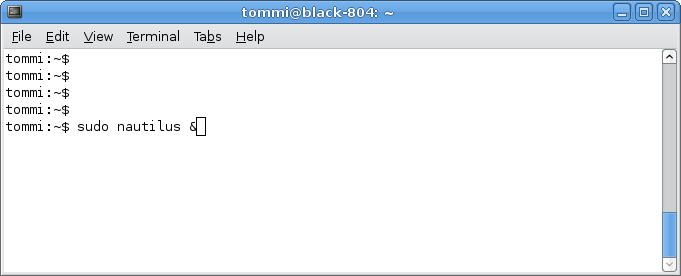
In Linux, the files under /usr are protected, in order to keep the system secure against viruses, and users accidentally deleting file. To be able to edit files you need administrator (aka super-user, aka root) privileges. An easy way to do this is to start terminal, and then launch a file manager with administrator rights. To accomplish this, you can type the commands below in the terminal, to run Nautilus or Konqueror file-managers:
    sudo nautilus &
    sudo konqueror &
On some Linux systems nautilus may be missing, while some others may lack konqueror, but usually at least one them is available.
Which graphics cards do you recommend?
Cornerstone supports both NVidia and AMD graphics cards. Usually AMD cards support more display using only single card. For the appropriate performance we don't recommend low-end graphics cards.
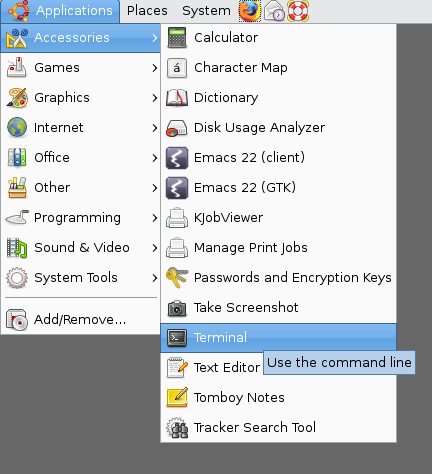
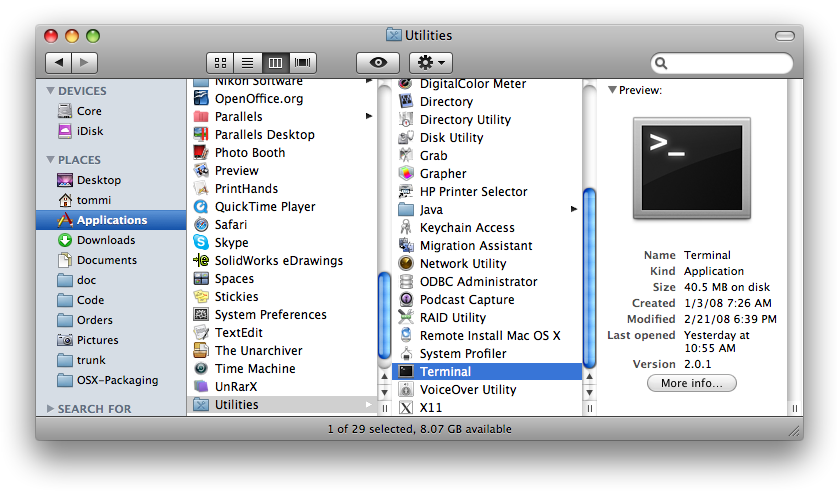
Many operations seem to require a "terminal". How do I start this?
On Linux The terminal is started from the system menus, for example:
On OS X the terminal application can be found in the Applications/Utilities folder, using Finder:
When I keep one or more markers on screen, the finger tracking gets poor sometimes. Why's that?
When a marker is put on the screen, Cornerstone will stop the automatic background calibration. This is done to avoid the situation where the marker gets burnt into the calibration image. As a consequence of this, the background IR image will not change at all, which may cause poor finger tracking in extended use.
To counter this issue you should try to keep the tracking conditions stable, when using markers. Alternatively you could lift all markers from the screen every sometimes, so that the background calibration can adapt to the lighting conditions.
There is a computer inside the MultiTaction Cell. Will the hard disk of the computer get corrupted if I turn off the power with telling the computer to shut down?
With the non-embedded versions of MultiTaction Cells, the hard disk is mounted in a read-only mode. This means that the device can be generally rebooted or shut down, without any worry of the file system being corrupted. As an exception, the file system is turned into read-write mode for saving parameters, and for software updates. During these operations the display must not be shut down.
With the embedded version of MultiTaction Cells, the hard-disk is mounted in a read-write mode. It is necessary to shut down the device from the operating system, to avoid hard disk corruption.
How do I access the internal computer of the non-embedded MultiTaction Cells?
The internal computer cannot be used freely by the clients. If you still feel that you'd like to use the internal computer, please contact MultiTouch sales.

