In this example we have two screens rotate clockwise as shown in the figure below.
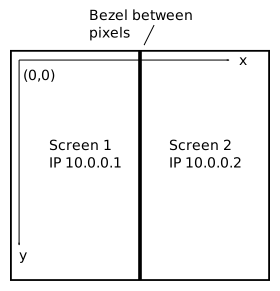
The bezel between the screens depends on you Cell model. Let's assume the screens are MT550S models, then the bezel is about 65 pixels.
screen.xml
<?xml version="1.0" encoding="UTF-8" standalone="no" ?>
<multihead type="HasValues">
  <dpi type="float">40.053</dpi>
  <window type="window">

    <area type="area">
      <active type="int">1</active>
      <graphicslocation type="3839">0 0</graphicslocation>
      <graphicssize type="vector">1080 1090</graphicssize>
      <keystone type="glkeystone">
        <rotations type="int">0</rotations>
        <v1 type="vector">0 0</v1>
        <v2 type="vector">1 0</v2>
        <v3 type="vector">1 1</v3>
        <v4 type="vector">0 1</v4>
      </keystone>
      <location type="vector">0 0</location>
      <seams type="vector">0 0 0 0</seams>
      <size type="vector">1920 1080</size>
    </area>

    <area2 type="area">
      <active type="int">1</active>
      <graphicslocation type="3839">1145 0</graphicslocation>
      <graphicssize type="vector">1080 1920</graphicssize>
      <keystone type="glkeystone">
        <rotations type="int">0</rotations>
        <v1 type="vector">0 0</v1>
        <v2 type="vector">1 0</v2>
        <v3 type="vector">1 1</v3>
        <v4 type="vector">0 1</v4>
      </keystone>
      <location type="vector">0 0</location>
      <seams type="vector">0 0 0 0</seams>
      <size type="vector">1920 1080</size>
    </area2>

    <frameless type="int">1</frameless>
    <fullscreen type="int">0</fullscreen>
    <location type="vector">0 0</location>
    <resizeable type="int">0</resizeable>
    <size type="vector">2160 1080</size>
  </window>
</multihead>
Above we created one window with two areas. Notice how bezel is taken into account when defining the second area origin (graphicslocation element). The dpi value (dots per inch) is for 55" model, corresponding
value for 42" model is 52.44.
config.txt
NetBridge {
  host = "10.0.0.1"
  input-rotate = "90"
  input-translate = "1080 0"
}
NetBridge {
  host = "10.0.0.2"
  input-rotate = "90"
  input-translate = "2225 0"
}
In tracker configuration we define that the screens are rotated 90 degrees. The apparent extra 1080 translation is due to the way rotations are handled, see screens and tracker page for explanation.

