The tracker run inside the screen and a tracker in one screen knows nothing about a tracker in another screen. Thus each screen outputs tracking data (finger, markers, hands) relative to their own origin located at upper left corner with the assumption the screen is in landscape orientation. If the screen is rotated or you have multiple screens, you need to transform and combine the tracking data to a coordinate system that matches the screen physical layout.
For example, be figure below illustrates two screen in landscape. Each screen outputs tracking data in its own coordinates.
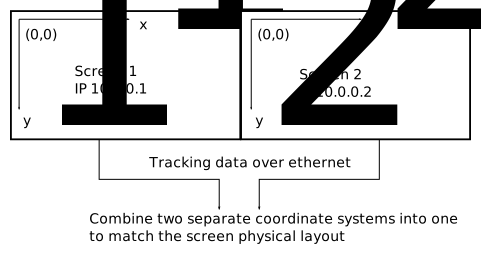
To transform and combine the tracking data into single coordinate system, put the following to config.txt.
NetBridge {
  host = "10.0.0.1"
  input-translate = "0 0"
}
NetBridge {
  host = "10.0.0.2"
  input-translate = "1920 0"
}
The input-translate keyword translates the tracking coordinates by an "x y" amount specified in the parenthesis. In this example, only output from screen 2 need to be translated.
If you need a screen in portrait orientation, you need to define rotation and translation. In the example below, we rotate the physical screen 90 degrees clockwise to make cooling easier by hot air blowing upwards.
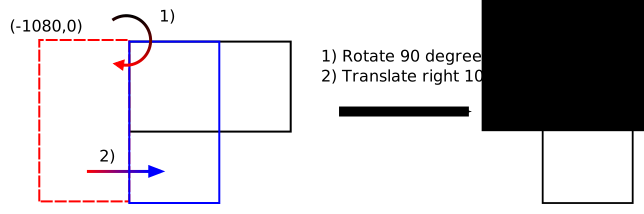
To make the tracking coordinate origin (0,0) to match the upper left corner of the rotated screen, you need the define the following in config.txt (the screen IP is assumed 10.0.0.1).
NetBridge {
  host = "10.0.0.1"
  input-rotate = "90"
  input-translate = "1080 0"
}
The rotation around the upper left corner is applied first and translation after that. The order of input-rotate and input-translate in the configuratin does not matter.
If you wish to rotate the screen 90 degress counter clockwise, then here's the configuration for it.
NetBridge {
  host = "10.0.0.1"
  input-rotate = "-90"
  input-translate = "0 1920"
}
Note the different translation needed. Rotating screen in this direction is not recommended, since hot air is now blown downwards.
Cell layout parameters
There are two layout parameters that are used to tell the tracking engine how the Cell is oriented:

