Logically, a Cell consists of two major parts, Screen and Tracking subsystems as shown in the figure below. The Screen is responsible for producing an visible picture and capturing images of user's hands as the screen is touched. The image data is fed to the tracking subsystem, which uses computer vision algorithms to recognize the location of user's fingers and hands and these are output as tracking data. The amount of tracking data is much less than the image data.
The Screen and Tracking subsystems are physically located inside the MultiTaction Cell. If you have an embedded version of the MultiTaction Cell, you can optionally run your application physically inside the Cells in the same embedded computer where the Tracker is running.
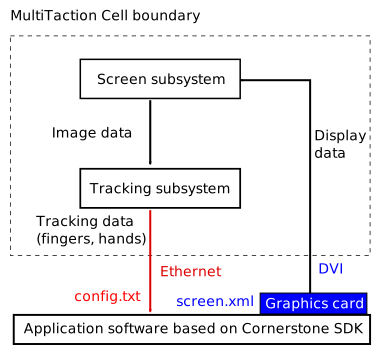
The block diagram also shows two files, screen.xml and config.txt. These contain parameters for the screen configration and the Tracker configuration, respectively. Note that the system block diagram mixes software and hardware components. A Cornerstone based application includes the Tracker by default and can perform the tracking by itself from FireWire supplied camera images. Or the application can receive tracking data over a network from another Cornerstone based application, since each Cornerstone based application can act as a server for tracking data. Which one of these happen depends on the configuration in config.txt file. The application always reads screen.xml and config.txt files during startup.
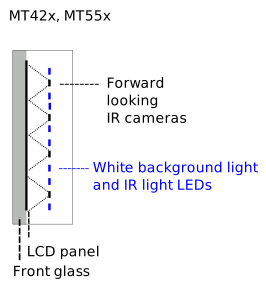
The drawing below shows a simplified hardware schematics of MultiTaction Cell. An LCD panel constructs the visible image by filtering the white light emitted by the background LEDs on pixel by pixel basis. In addition to that, infrared (IR) LEDs emit non-visible light through the LCD panel and front glass. An array of IR cameras look at the LCD direction, capture frames at high frame rate and send the image data to a computing unit. User's fingers and hands on the front glass reflect the IR light and they are recognized using machine vision algorithms in the computer.